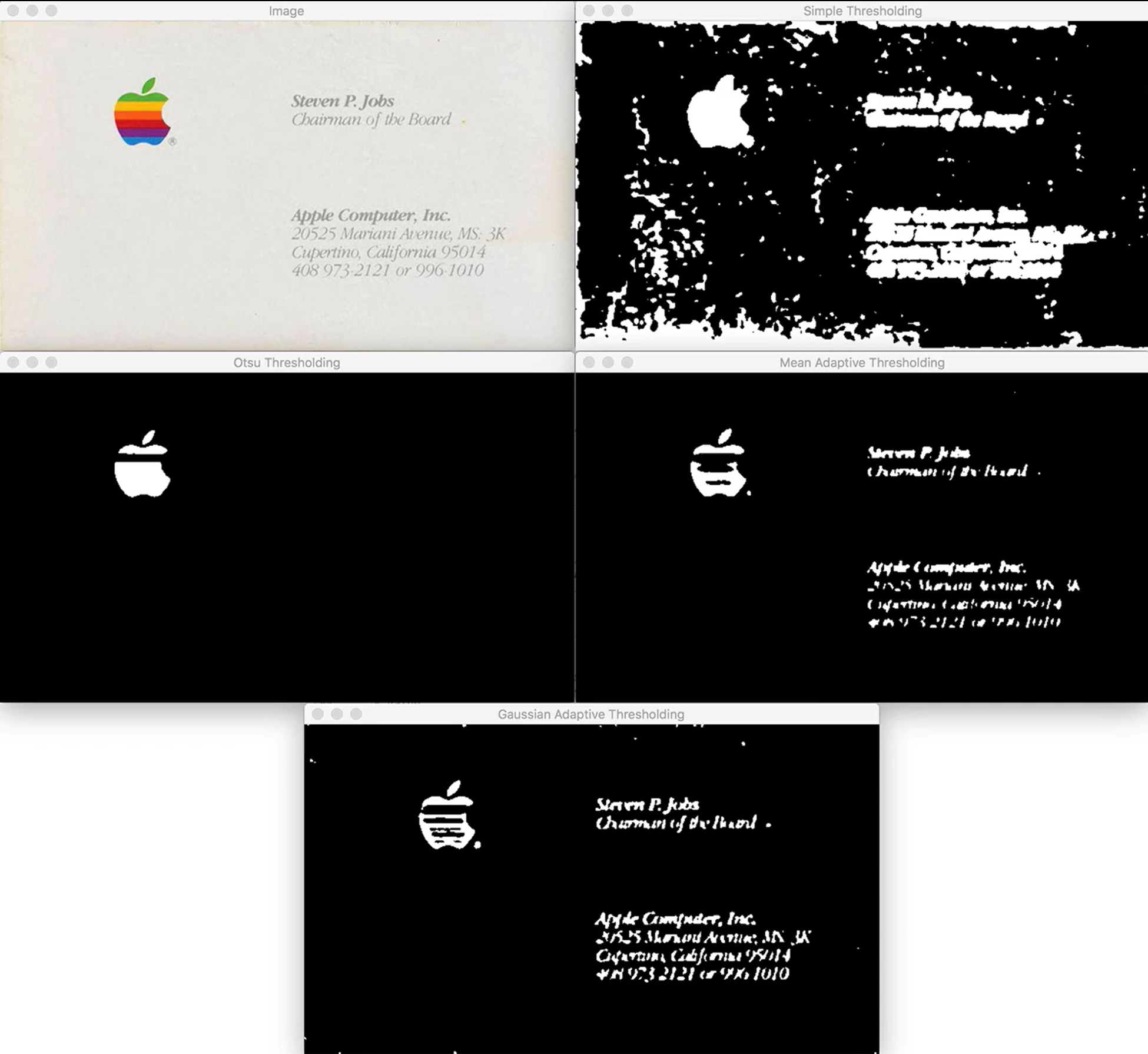
1. Thresholding(이진화)이란?
Thresholding은 그레이스케일 영상을 이진화하여 픽셀 값을 0 또는 255로 변환하는 기법
- 픽셀 값 p가 임계값 T보다 작으면 0(검정), 크면 255(흰색)을 할당
- 이 과정을 통해 전경(객체)과 배경을 손쉽게 분리가능
- Basic thresholding where you have to manually supply a threshold value, T
- Otsu’s thresholding, which automatically determines the threshold value
2. Basic thresholding : cv2.threshold
(1) 함수 구조
retval, dst = cv2.threshold(src, thresh, maxval, type)- 파라미터
- src: 입력 그레이스케일 영상
- thresh: 임계값 T
- maxval: 픽셀이 임계 검사에 통과했을 때 부여할 값 (보통 255(white))
- type: Thresholding 방식 플래그 (예: cv2.THRESH_BINARY_INV, cv2.THRESH_BINARY)
- 반환값
- retval: 실제 사용된 임계값 (Otsu 사용 시 자동 계산된 값)
- dst: 이진화 결과 영상
(2) 예시코드
# 입력 이미지는 grayscale이어야함
gray = cv2.cvtColor(image, cv2.COLOR_BGR2GRAY)

# 세세한 디테일을 조금 죽여주기 위해 gaussian blurring 시행
blurred = cv2.GaussianBlur(gray, (7, 7), 0)

# threshold inverse 시행(foreground가 white/ 얘를 주로 사용)
(T, threshInv) = cv2.threshold(blurred, 200, 255, cv2.THRESH_BINARY_INV)
# threshold 시행(foreground가 black)
(T, threshInv) = cv2.threshold(blurred, 200, 255, cv2.THRESH_BINARY)

# 확인위해 원본 이미지 위에 masking
masked = cv2.bitwise_and(image, image, mask=threshInv)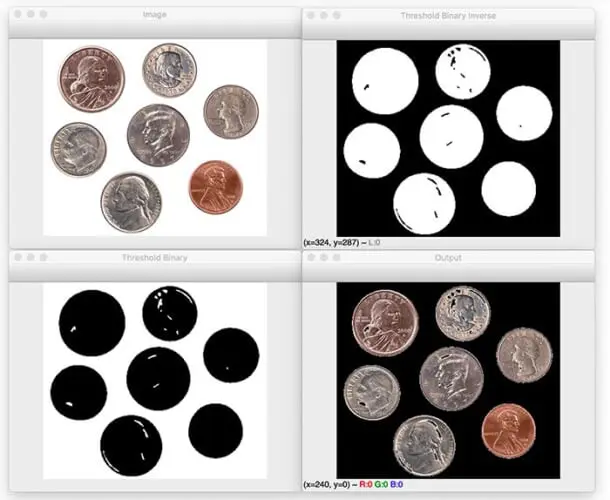
3. Otsu’s thresholding
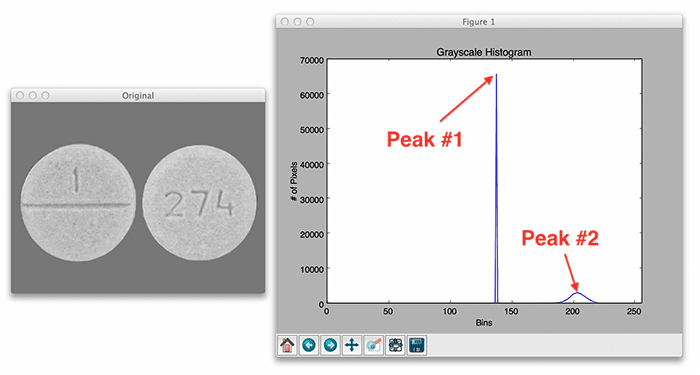
- 전제: 픽셀 강도 분포가 “두 개의 봉우리(이중봉)”를 갖는 bi‐modal 히스토그램일 때 최적 성능
사용자가 임계값을 지정해주지 않고 모델이 두개의 peak를 구분할 수 있는 T값 을 자동적용하기 때문 - 한계:
- 봉우리 분포가 아닐 경우 결과가 부정확
- 전역(글로벌) Thresholding 방식이므로, 영역별 조명 불균일 상황에서는 adaptive thresholding을 사용해야 함
# 임계값 설정은 0으로
(T, threshInv) = cv2.threshold(blurred, 0, 255, cv2.THRESH_BINARY_INV | cv2.THRESH_OTSU)
4. Adaptive thresholding : cv2.adaptiveThreshold
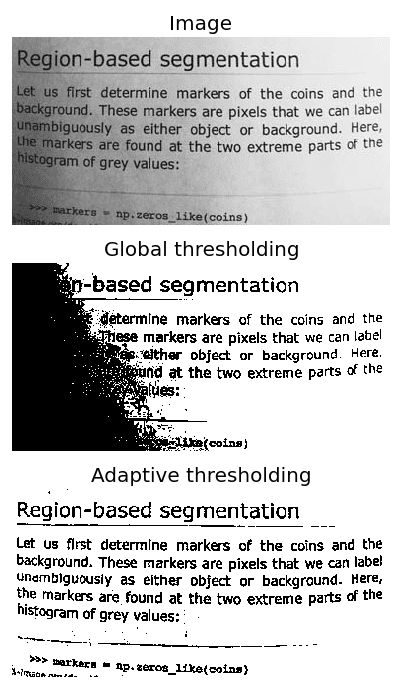
조명 불균일로 인해 전역(Global) Thresholding이 어려운 상황에서, 이미지를 작은 영역(Local) 단위로 분할하여 각 영역에 최적의 임계값을 적용하는 기법
(1) 장점
- 전역 Thresholding 한계: 단일 임계값 T를 이미지 전체에 적용하면, 밝기가 다른 영역에서는 적절히 동전·문자·객체를 분리하지 못할 수 있음
- Adaptive Thresholding 장점: 지정한 blockSize별로 T를 계산하여, 그림자나 하이라이트가 섞여 있는 이미지에서도 더 정교한 분할을 제공
- 조명 변화가 큰 문서 스캔, OCR 전처리, 불균일 배경의 객체 검출 등에 강력
(2) 함수 구조
result = cv2.adaptiveThreshold(src, maxValue, adaptiveMethod, thresholdType, blockSize, C)| src | 그레이스케일로 변환 및 블러링된 입력 영상 |
| maxValue | 임계 검사에 통과한 픽셀에 부여할 값 (보통 255) |
| adaptiveMethod | cv2.ADAPTIVE_THRESH_MEAN_C 또는 cv2.ADAPTIVE_THRESH_GAUSSIAN_C |
| thresholdType | cv2.THRESH_BINARY 또는 cv2.THRESH_BINARY_INV |
| blockSize | 임계값을 계산할 이웃 픽셀 영역의 크기 (홀수여야함) |
| C | 임계값 보정 상수(양수·음수 모두 가능) |
(3) 예시 코드
thr_mean     = cv2.adaptiveThreshold(blurred, 255,
                   cv2.ADAPTIVE_THRESH_MEAN_C,
                   cv2.THRESH_BINARY_INV,
                   21, 10)

# 5. Adaptive Thresholding (Gaussian)
thr_gauss    = cv2.adaptiveThreshold(blurred, 255,
                   cv2.ADAPTIVE_THRESH_GAUSSIAN_C,
                   cv2.THRESH_BINARY_INV,
                   21, 4)
(4) 활용 팁
- blockSize 튜닝:
- 너무 작으면 노이즈 민감, 너무 크면 전역 Thresholding과 유사해짐.
- C 조절:
- 양수: 더 엄격한 분할(작은 전경 강조)
- 음수: 더 관대한 분할(배경 일부까지 전경 처리)
- 메서드 선택:
- 일반 잡음 제거 → MEAN_C
- 중심 강조 및 엣지 보존 → GAUSSIAN_C
출처
OpenCV Thresholding ( cv2.threshold ) - PyImageSearch
In this tutorial, you will learn how to use OpenCV and the cv2.threshold function to apply basic thresholding and Otsu thresholding. A dataset for this topic enables us to understand the effect of different thresholding techniques on different types of…
pyimagesearch.com
'PyImageSearch' 카테고리의 다른 글
| OpenCV - Edge detection (0) | 2025.06.14 |
|---|---|
| OpenCV - Image Gradients(엣지검출) (0) | 2025.06.13 |
| OpenCV - Color Spaces (0) | 2025.06.12 |
| OpenCV - 블러처리 (2) | 2025.06.12 |
| OpenCV - Morphological Operations(형태학적 연산) (0) | 2025.06.11 |


